


GroPoint™ Bluetooth SDI-12 Data Logger Kit
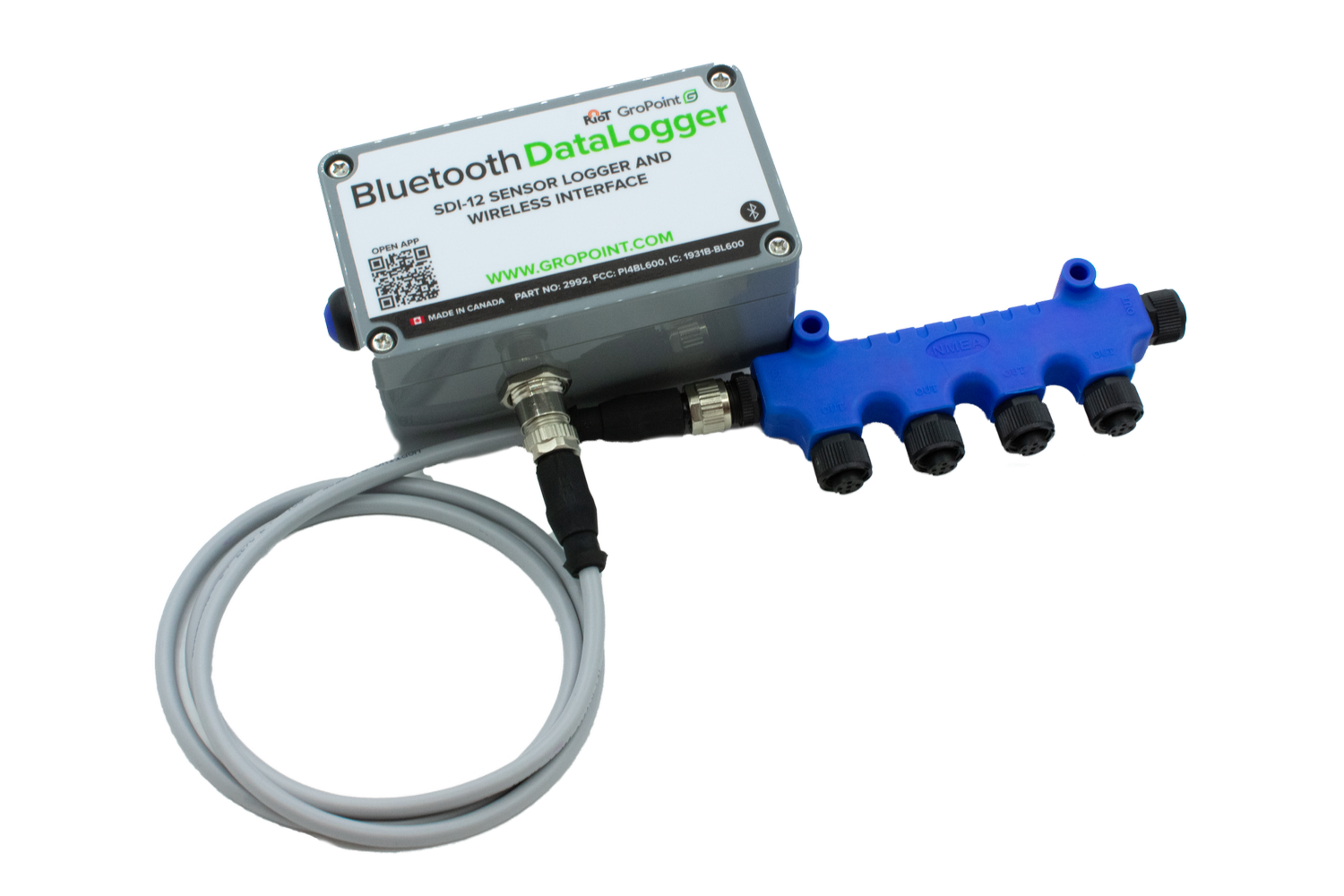
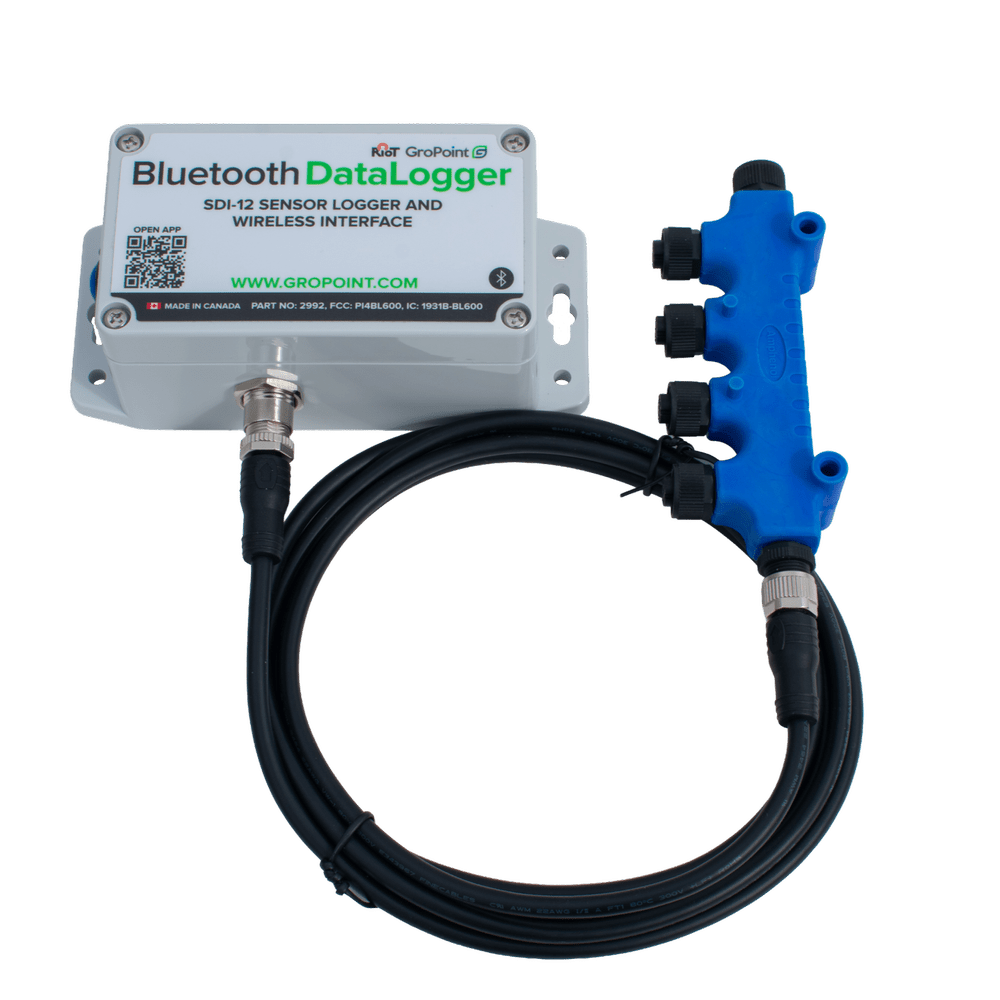
The GP-BTDL Bluetooth SDI-12 Data Logger Kit includes a Bluetooth SDI-12 Data Logger, 4-Port SDI-12 Expansion Bar, M12 Male to Female Cable, and 3.6V C-Cell Battery. Designed for flexible field deployment, the kit allows you to connect and monitor multiple SDI-12 sensors while wirelessly retrieving logged data using the free GP Reader Android app. :contentReference[oaicite:0]{index=0}
Key Features
-
Complete ready-to-deploy kit includes:
- Bluetooth SDI-12 Data Logger
- 4-Port SDI-12 Expansion Bar
- M12 Male to Female Cable
- 3.6V C-Cell Battery
- Connects up to 10 SDI-12 sensors using multiple 4-port expansion bars.
- Wireless Bluetooth retrieval allows users to download data directly to a smartphone or tablet during quick site visits.
- Configurable measurement intervals from 1 minute to 12 hours using the GP Reader Android app. :contentReference[oaicite:1]{index=1}
- Bluetooth 4.0 LE wireless communication with a typical operating range up to 60 m (200 ft). :contentReference[oaicite:2]{index=2}
- Typical battery life of several years depending on sensor configuration and logging interval.
- Rugged IP65-rated enclosure designed for long-term outdoor deployment.
- Compatible with most SDI-12 compliant third-party sensors. :contentReference[oaicite:3]{index=3}
- 4 MB onboard storage retains data even if the primary battery is removed or depleted.
- What’s Included
- Specifications
- FAQs
- Downloads
| Part Name and Quantity | Part No. |
| 1 x GP-DLBT Bluetooth SDI-12 Datalogger | Part 2992 |
| 1 x M12 Male to Female Cable | Part 2999 |
| 1 x 4-Port Expansion Bar | Part 2998 |
| 1 x Li-SOCi2 C-Cell Battery | Part 6230 |
| Output | CSV text file via USB cable (included) |
| Sensor interface | SDI-12 / RS-485 (SDI-12 version) |
| Sensor port connector | 1x Switchcraft EN3P4F (4 female pins) |
| Maximum number of sensors | 10 (via multiple 4-Port SDI-12 Expansion Bars) Depending on measurement interval and type of sensor, additional sensors may be configured. Up to 60 SDI-12 sensors may be configured depending on cable length and sensor power requirements |
| Wireless protocol | Bluetooth 4.0 LE |
| Storage | 4 MB This is the equivalent of: > 200K GroPoint Lite measurements > 80K moisture and temperature measurements from a GroPoint Profile 4-segment sensor |
| Measurement interval | Configurable by user Range: 1 minute to 12 hours |
| Operating temperature range | -20°C to 65°C (-4°F to 150°F) |
| Storage temperature range | -20°C to 70°C (-4°F to 160°F) |
| Power | 3.0V lithium coin cell powers the memory (included) 2 x AA alkaline batteries OR 3.6V 1x C-cell Li-ion battery powers the sensors (included) |
| Battery life | Up to several years, depending on measurement interval and battery selection |
| Dimensions | 11.4 cm x 8.0 cm x 6.0 cm (4.49” x 3.15” x 2.36”) |
| Weight | 216 g (7.62 oz) |
| Warranty | 1-year limited parts and labour |
| Environmental sealing | Enclosure: IP65 Push button: IP67 Sensor connectors: IP66/IP68 |
| Order Number | Part 2992-KIT |
Is over-the-air firmware updating supported on the GroPoint Bluetooth Datalogger?
GroPoint Bluetooth Dataloggers with firmware versions 3.3 and higher support FOTA updates. See the GP-BTDL manual for instructions.
Is the Bluetooth Datalogger compatible with non-GroPoint sensors?
Yes. The GroPoint Bluetooth datalogger can be used with other third-party SDI-12 sensors as long as they conform to SDI-12 protocol, can run from a switched 9 V power supply, the sensor power draw does not exceed 50 mA continuous and 100 mA peak, and a 2 second power on delay is a sufficient warm up time. Sensors that require continuous power can be used if external power is supplied to the sensor.
Is the GP Reader app available on Apple devices?
At the moment, the Bluetooth SDI-12 Data logger software “GP Reader” is only available for Android devices. Please let us know if you require iOS support so we can prioritize this project based on customer demand.
Which Android versions does the GP Reader app support?
Android 8 and higher.
What communication protocol and electrical interface does the GroPoint Bluetooth Datalogger support?
The GroPoint Bluetooth Datalogger only supports SDI-12 communication and electrical interface.
How do I connect my sensor that doesn’t have a connector to the Bluetooth Datalogger?
To connect a sensor that does not have a connector already, you will need to purchase an M12 5-pin code A male connector to attach to your sensor. The pin connections are:
Pin 1: Sensor Power
Pin 2: None
Pin 3: None
Pin 4: SDI-12 I/O
Pin 5: GND.
How many sensors can be connected to one Bluetooth Datalogger?
GroPoint Bluetooth Dataloggers follow the SDI-12 standard and can support up to 10 sensors on a single SDI-12 bus. GroPoint’s BTDL kit comes with either a 4-port or 2-port expansion bar to connect multiple sensors to one BTDL.
How can I change my sensor’s address using the Bluetooth Datalogger?
Only one sensor can be attached when changing the sensor address. In the GP Reader App, press “Change Address”. The current sensor address is displayed and you can select a new one by dragging the blue dot around the wheel. Once an address is chosen, press “Set Address”.
Does the Bluetooth Datalogger need to be kept in a watertight enclosure?
The Bluetooth SDI-12 Datalogger enclosure is IP76 rated, meaning it can withstand immersion in water up to one meter (3.3 feet) for 30 minutes under laboratory test conditions. However, this is not considered an environmentally hardened enclosure. While it does not need a more watertight enclosure, it is a good idea to keep it out of direct exposure to the elements and raised off the ground.
Is it possible to send custom SDI-12 commands to sensors using the Bluetooth Datalogger?
GP Reader has a transparent mode for sending SDI-12 commands to a connected sensor. Press and hold “Measure” to activate transparent command mode.
How can I change the logging interval on my Bluetooth Datalogger?
To change the logging interval of your BTDL, go to the configuration menu by pressing “Config…”. Select the desired measurement interval from the list then press “Update”. The BTDL cannot be logging when you change configuration settings so you must download any data you have logged then stop and erase the logger.
How long does it take for the Bluetooth Datalogger to complete a measurement?
Total measurement time depends on the sensor or sensors being measured. There is always an initial 2 second power on delay, then each measurement sequence (send measurement command, measurement completes, send get data commands). For example GPLP moisture and temperature measurement times:
2-segment: 1.4 s
3-segment: 1.6 s
4-segment: 2.0 s
5-segment: 2.1 s
6-segment: 2.6 s
8-segment: 3.6 s.
If you have multiple sensors connected on one BTDL, these times are added together.
What is the Local Log File feature and should I enable it?
The Local Log File feature logs all communication between the app and the data logger. It is intended for diagnostics if there is an issue with the BTDL. Enable it only for troubleshooting because it slows data download rates by about 15 percent.
What is the Daily Sampling feature?
Daily sampling conserves battery life by adjusting the data logger's measurement interval based on temperature readings from a connected GroPoint GPLP Profile sensor. The logger checks the temperature once per day at a user-defined time, and if it is below a chosen threshold, it switches to daily measurements. Once temperatures rise above the threshold, it returns to the regular measurement interval.
What format will data be downloaded in?
The default data format is .txt with a comma delimiter. This can be customized in the About menu of the GP Reader app. Supported file formats are .txt, .csv and .dat and all can use a comma, semicolon or tab as delimiters between values.
Each reading in the parsed data files begins with date and time, followed by the sensor address, moisture measurements from each segment and then temperature measurements. For example, parsed data from a 6-segment GPLP sensor:
2024-03-08 14:53,0,+30.9,+54.2,+51.3,+16.6,+27.5,+26.6,+23.1,+22.3,+21.8,+21.3,+21.5,+21.1,+21.0,+20.7,+20.6,+20.2,+20.5
How can I identify which data file belongs to a specific sensor?
Downloaded data files are named using the format “{friendly name} (sensor’s serial number)”. For example, if the logger’s friendly name is “MyLogger” and the sensor’s serial number is “600123” then the data file name is “MyLogger (600123).txt”. If you have multiple sensors logging, each file contains each sensor’s unique serial number.
Where can I find the downloaded data files from the GP Reader app on my Android device?
When you first download GP Reader and connect to a BTDL logger, you are prompted to select a file location to create the GPReader folder. Using the Documents folder is recommended for easy access. Files for the same logger and sensor append data automatically.
How do I export the data from my Android device to my PC so I can analyze it with software?
You can share files recently downloaded to your Android device via email using the share button in GP Reader, located beside the About button. Alternatively, navigate to the GPReader folder and select files to send by email.
Will I lose my data if the batteries in my Bluetooth Datalogger run out?
Your data is stored safely in the logger even if the batteries die. During a low battery state some data may become corrupted or missing, so replace batteries before downloading data. For AA configuration, use Energizer Lithium Ultimate. For the C-Cell we recommend SAFT LSH14 Li-SOCL-2.
How long will the batteries in my Bluetooth Datalogger last?
Battery life depends on measurement interval, number of measurements, number of sensors attached and operating temperature. For estimates with GPLP sensors, see the Battery Capacity Calculator.
How can I tell if the batteries in my Bluetooth Datalogger are low?
GP Reader has a battery voltage indicator with colours:
Green: battery voltage is good
Yellow: change batteries soon
Red: replace batteries immediately.
If the indicator is yellow, change batteries before logging again. BTDLs can ship with either 2 x AA batteries or a single C-Cell battery. If you change battery type, update the battery settings in your BTDL, otherwise battery warnings will be inaccurate. Long press on the battery voltage indicator to select the correct battery type.
What are the battery requirements for the BTDL?
Max pulse current: at least 500 mA over 100 ms over the full temperature range of the battery.
Battery voltage: 3.6 V.
We recommend Energizer Lithium Ultimate for AA and SAFT LSH14 Li-SOCL-2 for C-Cell, as both supply the required pulse current and ensure logger longevity.
What are the possible reasons my Bluetooth Datalogger will not start logging?
Several issues can prevent your BTDL from starting to log data:
- Ensure your GP Reader app and Bluetooth Datalogger firmware are up to date.
- Check that sensors are properly connected and responsive.
- Verify that the sensor addresses in your configuration are accurate.
- Avoid duplicate sensor addresses. Disconnect all sensors and check each address individually.
- Check the battery voltage in GP Reader. If the battery is too low, you will see a warning.
- If no sensors respond, one sensor may have a fault affecting grounding or the SDI-12 bus. Check each sensor individually.
- If using the 4-port adapter, do not attach protective plugs to unused ports, because some have internal connections that can disrupt SDI-12 communication.
- Confirm that wiring between the sensor and Bluetooth datalogger matches the wiring diagrams.
What can cause my Bluetooth Datalogger to fail during data download or parsing, and how can I resolve it?
Possible reasons include outdated GP Reader app or firmware, low battery, data corruption due to low power, or missing data from connection or power issues. Check for updates, replace batteries, and verify sensor connections. If the issue persists, contact support@gropoint.com for help recovering data.
What should I do if an error occurs while downloading or parsing data?
If an error occurs while downloading data, the app prompts you to resume when you reconnect. Check sensor connections and battery voltage. If it continues, enable Local Log File in the About menu. This creates a log file (GPReaderLog.txt) in the GPReader download folder that can be sent to support for diagnostics.
If an error occurs while parsing data, you can send raw data files to support@gropoint.com for parsing. Raw files use the logger’s friendly name and end in a three-digit extension starting with .001. Having the log file enabled is helpful.
What should I do if I am having trouble connecting via Bluetooth?
Some Android devices take longer to find the BTDL via Bluetooth. Ensure the BTDL is powered on and give the device a few scan cycles. If it still does not connect reliably, toggle Bluetooth off and on to reset it. Location services must be enabled on your device or GP Reader cannot connect to a BTDL.
Downloads
Datasheets/ Manuals
Bluetooth SDI-12 Datalogger ManualBluetooth SDI-12 Datalogger Kit Datasheet
Software
Smartphone/Tablet AppGroPoint Product Catalog
GroPoint Product CatalogSubmit a General Inquiry
Videos
GroPoint Tutorials: Data Logger Setup
Step-by-Step Guide: Set Up the Data Logger and Connect a Sensor
GroPoint Tutorials: Multiple Sensor Setup
Step-by-Step Guide: Set Up the Data Logger and Connect a Sensor